
GET ON THE LIST
GET ON THE LIST
Know What's Next in Student Housing
Know What's Next in Student Housing
by signing up here:
by signing up here:
How to Audit Your Housing Application Process in 20 Minutes
How to Audit Your Housing Application Process in 20 Minutes
Most housing and residence life teams know their application process has friction — but they can't pinpoint exactly where. This free worksheet helps you find the 3 highest-leverage fixes in your housing application workflow, without hiring a consultant or waiting for a survey cycle.
Every spring, the same pattern plays out across campus housing offices. Students start the housing application, get stuck, and do one of four things: they abandon, they call your office, they email asking if it "went through," or they submit twice. Your staff — from RAs to coordinators to assignment managers — spends hours fielding questions that a clearer process could have prevented.
The problem isn't that your team is doing something wrong. It's that most campus housing systems were built to collect data and manage assignments, not to guide students through a process. There's a gap between what your system does and what a student experiences — and that gap is where the confusion lives.
We built a simple worksheet to help you close that gap. It takes about 20 minutes, uses only what you already know about your own housing process, and produces a prioritized list of fixes you can act on before peak season.
What the Worksheet Actually Does
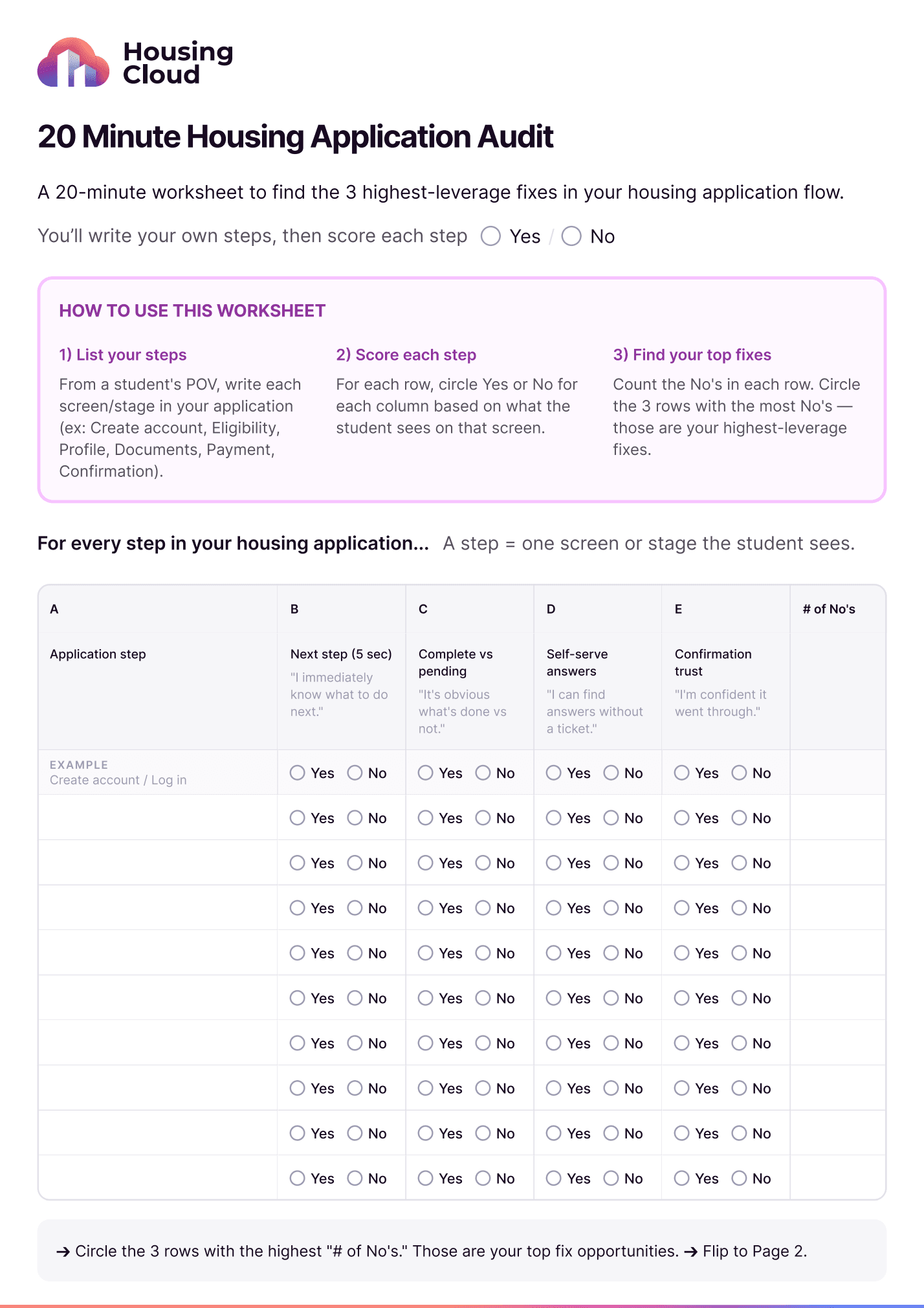
The "20 Minute Housing Application Audit" is a two-page, print-or-digital worksheet designed for anyone who works in housing and residence life — whether you're a director overseeing the full operation, an assistant director managing assignments, a coordinator handling day-to-day student questions, or a res life professional who sees the fallout firsthand. No login required, no software demo — just a structured way to evaluate your own application from the student's perspective.
Here's the process: you list every step a student sees in your housing application — from account creation through room selection to confirmation. Think about what's on-screen at each stage: the account setup, eligibility check, profile and preferences, room selection, document upload, payment, and the final confirmation or status page. Then you score each step against four criteria that directly predict whether students will get stuck.
Those four criteria are:
Next step clarity — Can a student figure out what to do next within 5 seconds of landing on this screen? If they have to hunt for a button, read a paragraph of instructions, or guess what happens after they click "Submit," that's a No.
Complete vs. pending visibility — Is it immediately obvious what's finished and what still needs attention? Progress indicators, checkmarks, and clear status labels all contribute here. Vague language like "In Progress" without context is a red flag — especially during room selection when students are anxious about securing their assignment.
Self-serve answers — Can a student find the answer to a common question without submitting a ticket or calling your housing office? If your FAQ is buried behind multiple navigation steps or doesn't address "What documents do I need?" — that's another No.
Confirmation trust — After completing a step, does the student feel confident it actually worked? A generic "Thank you" page with no details about what happens next doesn't build trust. A confirmation that says "Your housing application was received — assignments will be released by [date]" does.
For every row, you count the No's. The three steps with the most No's are your highest-leverage fixes.
Why "Confusing" Is a Symptom, Not a Diagnosis
When students describe the housing application as "confusing," what they almost always mean is: I don't know what to do next. It's not that the process is complicated — it's that the system isn't giving them a clear signal about where they stand and what their next action is.
This matters because "confusing" is vague enough to be paralyzing for your team. If a student says your housing portal is confusing, you don't know whether the problem is the eligibility page, the document upload step, room selection, the payment screen, or the confirmation. The audit worksheet forces specificity: which step is confusing, and which dimension of clarity is missing?
That shift — from "the housing application is confusing" to "the document upload step doesn't tell students what happens after they submit" — is what makes fixes actionable. It's the difference between a vague Student Affairs committee discussion and a concrete work order.
The Three Patterns That Show Up in Almost Every Audit
After working with dozens of housing and residence life teams across institutions of all sizes, we see the same three patterns surface repeatedly when teams complete this worksheet.
First, the "What's next?" problem. Students finish one step and can't immediately see what to do next. This is especially common after payment or document upload, where the system processes something in the background but the student sees a dead end. It's also common right after room selection, when students don't know whether their assignment is confirmed or still pending. The fix is straightforward: every screen needs one clear next action, in one place, with no ambiguity.
Second, the complete-vs.-pending problem. Students can't tell what's done and what isn't. This shows up most often in multi-part applications where a student completes three of five sections, leaves, and comes back to a dashboard that doesn't clearly distinguish between completed, in-progress, and not-started items. Housing operations teams know this pattern well — it's the source of most "Is my application complete?" calls. Clear labels and visual status indicators eliminate those calls.
Third, the confirmation trust problem. Students complete the final step and don't feel confident that it worked. This is the single biggest driver of double-submissions and "just checking" emails to your housing office. A trustworthy confirmation page tells the student exactly what was submitted, what happens next (and when), and where they can check their status later.
How to Use the Results
Page 2 of the worksheet is where the audit turns into action. You write down your top three problem steps from Page 1, then answer a key diagnostic question: When students get stuck on this step, what do they actually do?
The answer tells you how urgent the fix is. If students abandon, you're risking occupancy numbers. If they call, you're burning staff time during your busiest season. If they double-submit, you're creating data cleanup work for your assignments team. If they email to confirm it "went through," your confirmation screen needs immediate attention.
You don't need to redesign your entire housing system. Start with the step that has the most No's and the worst student fallout behavior. Fix that one step, measure the change in support volume, and move to the next. Many of these fixes — clearer button labels, better status language, a more specific confirmation page — don't require a system migration. They require clarity about what's broken.
Get the Free Worksheet
Download the fillable PDF version of the 20 Minute Housing Application Audit below. You can complete it digitally or print it out for your next housing staff meeting.
Download the 20 Minute Housing Application Audit →
If you'd like help interpreting your results or want a walkthrough with one of our team members, you can also schedule a free application review and we'll work through the findings together.
#StudentHousing
#HigherEd
#ResidenceLife
#CampusHousing
#StudentExperience
#HousingOperations
#EdTech
#ProcessImprovement
#UXDesign
#HigherEducation

Team Housing.Cloud
Campus Investment
/
GET ON THE LIST
Know What's Next in Student Housing
by signing up here:
How to Audit Your Housing Application Process in 20 Minutes
Most housing and residence life teams know their application process has friction — but they can't pinpoint exactly where. This free worksheet helps you find the 3 highest-leverage fixes in your housing application workflow, without hiring a consultant or waiting for a survey cycle.
Every spring, the same pattern plays out across campus housing offices. Students start the housing application, get stuck, and do one of four things: they abandon, they call your office, they email asking if it "went through," or they submit twice. Your staff — from RAs to coordinators to assignment managers — spends hours fielding questions that a clearer process could have prevented.
The problem isn't that your team is doing something wrong. It's that most campus housing systems were built to collect data and manage assignments, not to guide students through a process. There's a gap between what your system does and what a student experiences — and that gap is where the confusion lives.
We built a simple worksheet to help you close that gap. It takes about 20 minutes, uses only what you already know about your own housing process, and produces a prioritized list of fixes you can act on before peak season.
What the Worksheet Actually Does
The "20 Minute Housing Application Audit" is a two-page, print-or-digital worksheet designed for anyone who works in housing and residence life — whether you're a director overseeing the full operation, an assistant director managing assignments, a coordinator handling day-to-day student questions, or a res life professional who sees the fallout firsthand. No login required, no software demo — just a structured way to evaluate your own application from the student's perspective.
Here's the process: you list every step a student sees in your housing application — from account creation through room selection to confirmation. Think about what's on-screen at each stage: the account setup, eligibility check, profile and preferences, room selection, document upload, payment, and the final confirmation or status page. Then you score each step against four criteria that directly predict whether students will get stuck.
Those four criteria are:
Next step clarity — Can a student figure out what to do next within 5 seconds of landing on this screen? If they have to hunt for a button, read a paragraph of instructions, or guess what happens after they click "Submit," that's a No.
Complete vs. pending visibility — Is it immediately obvious what's finished and what still needs attention? Progress indicators, checkmarks, and clear status labels all contribute here. Vague language like "In Progress" without context is a red flag — especially during room selection when students are anxious about securing their assignment.
Self-serve answers — Can a student find the answer to a common question without submitting a ticket or calling your housing office? If your FAQ is buried behind multiple navigation steps or doesn't address "What documents do I need?" — that's another No.
Confirmation trust — After completing a step, does the student feel confident it actually worked? A generic "Thank you" page with no details about what happens next doesn't build trust. A confirmation that says "Your housing application was received — assignments will be released by [date]" does.
For every row, you count the No's. The three steps with the most No's are your highest-leverage fixes.
Why "Confusing" Is a Symptom, Not a Diagnosis
When students describe the housing application as "confusing," what they almost always mean is: I don't know what to do next. It's not that the process is complicated — it's that the system isn't giving them a clear signal about where they stand and what their next action is.
This matters because "confusing" is vague enough to be paralyzing for your team. If a student says your housing portal is confusing, you don't know whether the problem is the eligibility page, the document upload step, room selection, the payment screen, or the confirmation. The audit worksheet forces specificity: which step is confusing, and which dimension of clarity is missing?
That shift — from "the housing application is confusing" to "the document upload step doesn't tell students what happens after they submit" — is what makes fixes actionable. It's the difference between a vague Student Affairs committee discussion and a concrete work order.
The Three Patterns That Show Up in Almost Every Audit
After working with dozens of housing and residence life teams across institutions of all sizes, we see the same three patterns surface repeatedly when teams complete this worksheet.
First, the "What's next?" problem. Students finish one step and can't immediately see what to do next. This is especially common after payment or document upload, where the system processes something in the background but the student sees a dead end. It's also common right after room selection, when students don't know whether their assignment is confirmed or still pending. The fix is straightforward: every screen needs one clear next action, in one place, with no ambiguity.
Second, the complete-vs.-pending problem. Students can't tell what's done and what isn't. This shows up most often in multi-part applications where a student completes three of five sections, leaves, and comes back to a dashboard that doesn't clearly distinguish between completed, in-progress, and not-started items. Housing operations teams know this pattern well — it's the source of most "Is my application complete?" calls. Clear labels and visual status indicators eliminate those calls.
Third, the confirmation trust problem. Students complete the final step and don't feel confident that it worked. This is the single biggest driver of double-submissions and "just checking" emails to your housing office. A trustworthy confirmation page tells the student exactly what was submitted, what happens next (and when), and where they can check their status later.
How to Use the Results
Page 2 of the worksheet is where the audit turns into action. You write down your top three problem steps from Page 1, then answer a key diagnostic question: When students get stuck on this step, what do they actually do?
The answer tells you how urgent the fix is. If students abandon, you're risking occupancy numbers. If they call, you're burning staff time during your busiest season. If they double-submit, you're creating data cleanup work for your assignments team. If they email to confirm it "went through," your confirmation screen needs immediate attention.
You don't need to redesign your entire housing system. Start with the step that has the most No's and the worst student fallout behavior. Fix that one step, measure the change in support volume, and move to the next. Many of these fixes — clearer button labels, better status language, a more specific confirmation page — don't require a system migration. They require clarity about what's broken.
Get the Free Worksheet
Download the fillable PDF version of the 20 Minute Housing Application Audit below. You can complete it digitally or print it out for your next housing staff meeting.
Download the 20 Minute Housing Application Audit →
If you'd like help interpreting your results or want a walkthrough with one of our team members, you can also schedule a free application review and we'll work through the findings together.
#StudentHousing
#HigherEd
#ResidenceLife
#CampusHousing
#StudentExperience
#HousingOperations
#EdTech
#ProcessImprovement
#UXDesign
#HigherEducation
Team Housing.Cloud
Campus Investment
/
Related post
Commitment to Security & Accessibility
We believe every student and staff member deserves a secure, accessible experience — that commitment is built into the platform.
Commitment to Security & Accessibility
We believe every student and staff member deserves a secure, accessible experience — that commitment is built into the platform.
Commitment to Security & Accessibility
We believe every student and staff member deserves a secure, accessible experience — that commitment is built into the platform.

Service Organization
Control Type II
SOC 2 Type II
SOC 2 Type II
SOC 2
Type II
Compliant
Compliant
Compliant
Cybersecurity
Service Organization
Control Type II
SOC 2
Type II
Compliant
Cybersecurity
Service Organization
Control Type II
SOC 2 Type II
Compliant
Cybersecurity
Web Content Accessibility
Guidelines Level AA
WCAG 2.1 AA
WCAG 2.1 AA
Compliant
Compliant
Compliant
VPAT Ready
Voluntary Product Accessibility Template
(Section 508)
Web Content Accessibility
Guidelines Level AA
WCAG 2.1 AA
Compliant
VPAT Ready
Voluntary Product Accessibility Template
(Section 508)
Web Content Accessibility
Guidelines Level AA
WCAG 2.1 AA
Compliant
VPAT Ready
Voluntary Product Accessibility Template
(Section 508)
Education
Technology 2023
Gold Winner
Top Student Engagement Solutions Provider
Top Student Engagement Solutions Provider
Top Student Engagement Solutions Provider
Education
Technology 2023
Gold Winner
Top Student Engagement Solutions Provider
Education
Technology 2023
Gold Winner